
• ChatGPT
  • Claude

Ask ChatGPT or Claude about your shop.

Connect Retriever once, then ask in your own words, in English or Nepali: today's sales, what is running low, which orders need packing, who owes you.

Part of Retriever Pro. The shop owner switches it on.

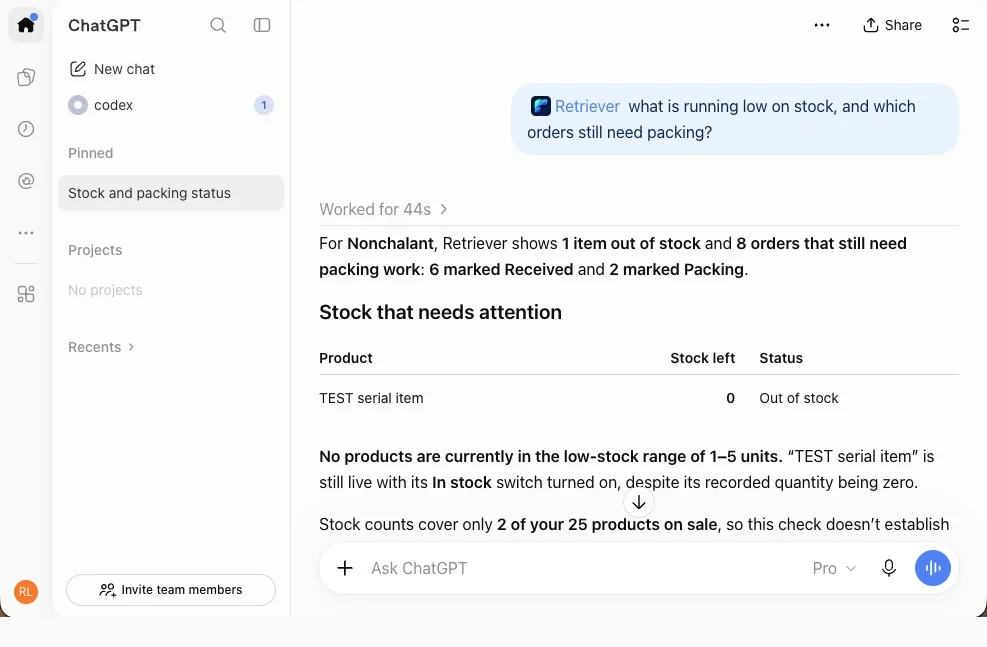
ChatGPT answering from Retriever in the Banana Store demo shop, asked what is running low on stock and which orders still need packing: under Stock that needs attention, 2 products out of stock and marked Urgent.
ChatGPT answering from Retriever · Demo shop

Ask the way you would ask a person.

  • How did sales go today compared with last Saturday?

    आजको बिक्री गएको शनिबारको तुलनामा कस्तो भयो?

  • What were my best sellers this month?

    यो महिना सबैभन्दा बढी बिक्ने सामान कुन-कुन थिए?

  • Which items are low on stock?

    कुन-कुन सामानको स्टक कम छ?

  • Which orders are still to pack?

    प्याक गर्न बाँकी अर्डर कुन-कुन छन्?

  • Who owes me on the credit book, and how much in all?

    खातामा कसले कति तिर्न बाँकी छ, जम्मा कति हो?

  • What bookings do I have today?

    आज कुन-कुन बुकिङ छन्?

In ChatGPT, start your question with @Retriever.

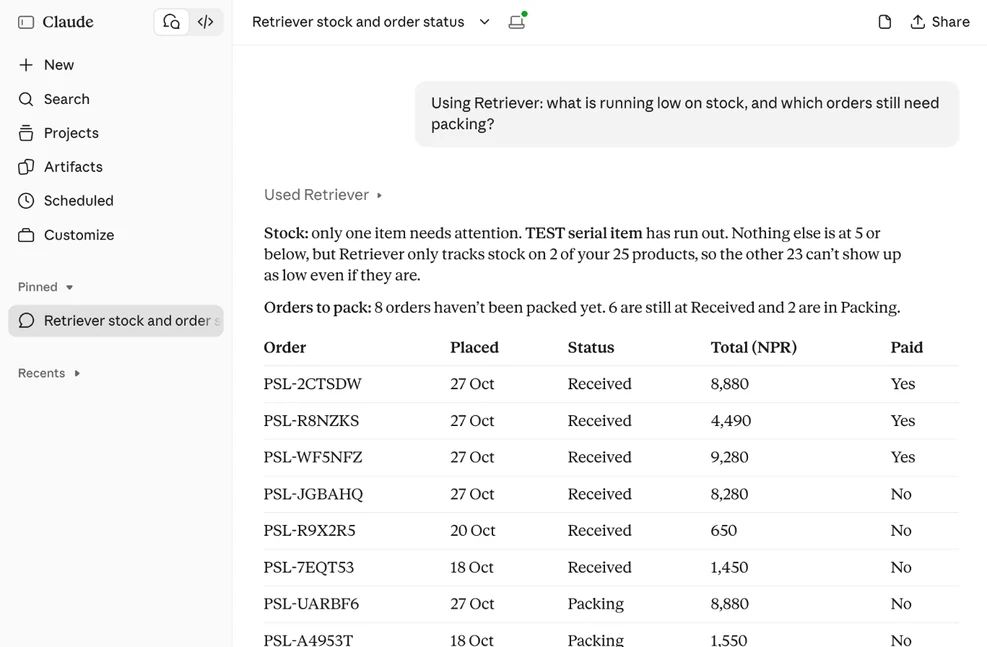
Claude answering from Retriever in the Banana Store demo shop, with figures from the shop's own records.
Claude answering from Retriever · Demo shop

Connect in a few steps.

First, the shop owner opens Settings → AI assistants in Retriever and switches on Let AI assistants read this shop. It is off for every shop until then, and staff cannot turn it on. Then each person connects their own app and signs in with their own Retriever account.

The address, the same for every shop

https://retriever.com.np/mcp

ChatGPT

  1. On a computer, open Plugins in ChatGPT.
  2. Press Add, then Add custom MCP server.
  3. Name it Retriever, paste the address as the Server URL and choose OAuth.
  4. Tick I understand and want to continue, then press Create as a plugin.
  5. On retriever.com.np, sign in, check the shop name and press Allow.
  6. In a chat, start with @Retriever.

Some ChatGPT plans, and some company workspaces, do not allow custom servers.

Claude

  1. Open Add Retriever to Claude. Claude opens Add custom connector with the name and address filled in.
  2. Press Continue. To add it by hand instead: Customize → Connectors → Add → Add custom connector, name it Retriever and paste the address.
  3. On retriever.com.np, sign in, check the shop name and press Allow.
  4. Start a new chat and ask. If Claude does not use Retriever, switch it on in that chat's connectors.

On a Claude Team or Enterprise plan, an owner of the Claude organisation may need to add it first.

When you press Allow, only reading the shop is ticked. Customer names and phone numbers, saving shop designs and making changes each have their own tick, and start unticked. Every step with pictures.

Claude Code, Cursor or Codex

Claude Code: run this, then type /mcp, pick retriever and sign in.

claude mcp add --transport http retriever https://retriever.com.np/mcp

Cursor: add this to .cursor/mcp.json (or ~/.cursor/mcp.json), then sign in from Cursor's MCP settings.

{
  "mcpServers": {
    "retriever": { "url": "https://retriever.com.np/mcp" }
  }
}

Codex: add this to ~/.codex/config.toml, then sign in from a terminal.

[mcp_servers.retriever]
url = "https://retriever.com.np/mcp"
codex mcp login retriever

Apart from ChatGPT and Claude, Retriever accepts a sign-in only from an app that returns to your own computer (localhost or 127.0.0.1). Steps checked on 21 October 2026; Codex's and Cursor's are from their own docs.

What it can and cannot do.

It can

  • Answer questions about sales, best sellers, stock, orders, bookings and the credit book. Questions change nothing.
  • Show a new look for your shop as a preview link. Your shop does not change.
  • Make everyday changes, such as a price, stock or opening hours, only after the owner switches on Let AI assistants make changes, and only after your yes each time. How changes work.

It never

  • Moves money, takes a payment, marks an order paid or refunds it.
  • Shows more than the signed-in person's own Retriever permissions allow. A cashier without Analytics gets no sales figures.
  • Changes your phone, address, PAN, VAT or payment details, or deletes products, orders or bookings.

ChatGPT वा Claude लाई रिट्रिभरसँग जोडेर आफ्नो पसलबारे सोध्न सकिन्छ। यो Pro को सुविधा हो, र मालिकले सेटिङ → AI सहायक मा खोलेपछि मात्र चल्छ। प्रश्न सोध्दा केही बदलिँदैन। परिवर्तन गर्न मालिकको छुट्टै अनुमति चाहिन्छ, र हरेक परिवर्तन तपाईंले च्याटमा हुन्छ भनेपछि मात्र हुन्छ। पैसा कहिल्यै सारिँदैन। कर्मचारीले आफ्नो अनुमतिभित्रको कुरा मात्र देख्छन्।

Questions.

Which plan do I need?

Retriever Pro. Every new shop starts on Pro free for 7 days, so you can try it straight away. It is not part of Free or Plus: after the trial, ChatGPT and Claude stop reading the shop until you choose Pro. See pricing.

Is Retriever in ChatGPT's or Claude's directory?

Retriever's listings in ChatGPT's plugin directory and Claude's connector directory are in review. Until they appear, add Retriever by its address, as in the steps above.

Where does my shop's data go?

What the assistant reads goes to the company that runs it: OpenAI for ChatGPT, Anthropic for Claude, under their own terms. Customer names and phone numbers are left out unless you tick them, and Retriever hides PAN and VAT numbers. Privacy: AI assistants.

How do I take access back?

Settings → AI assistants lists every connection, with Revoke and Revoke all. Switching off Let AI assistants read this shop stops all reading at once. A connection left unused for ninety days ends on its own.

Is this the same as Zuno?

No. Zuno is the assistant inside Retriever, with its own separate personal choice in Settings → AI assistants → Zuno. That choice does not connect ChatGPT or Claude to your shop.

More help: what the assistant can see, in detail · llms.txt · llms-full.txt

Open your shop.
Then ask about it.

Every new shop starts with 7 days of Pro free. No card to start.